Always-on-top recording widget
Minimal floating toolbar: record, pause, resume, manual capture when you need a step between clicks—and stop—all while you stay in your ERP, IDE, or browser.
Screenshots fire on every meaningful action, steps describe the controls you use, and shortcuts turn into readable instructions—so SOPs and runbooks build themselves while you work. Local on Windows; you choose when to export.
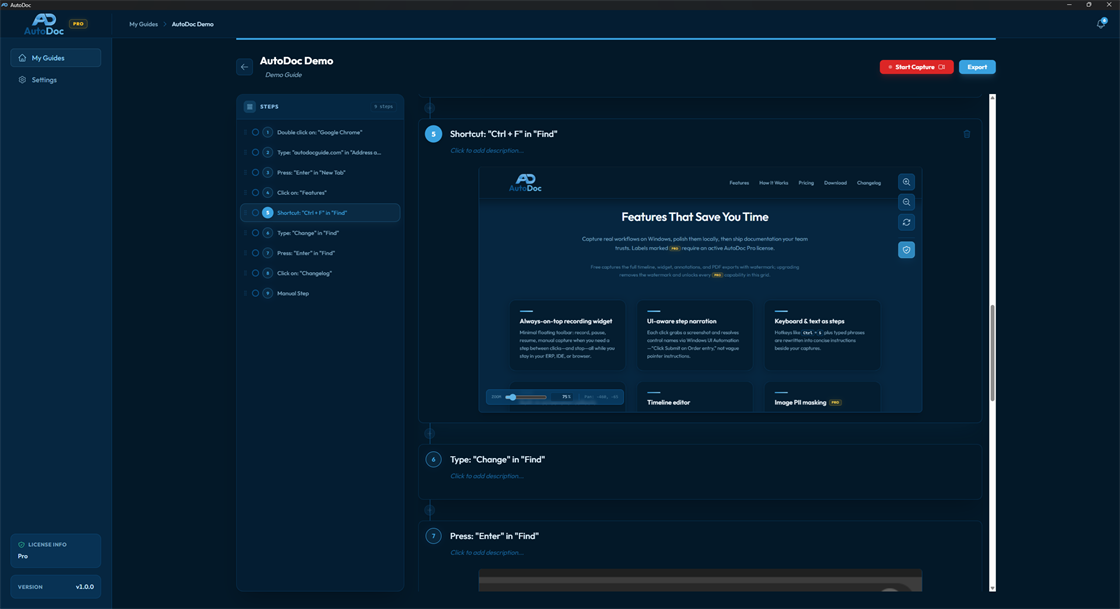
Capture real workflows on Windows, polish them locally, then ship documentation your team trusts. Labels marked require an active AutoDoc Pro license.
Free captures the full timeline, widget, annotations, and PDF exports with watermark; upgrading removes the watermark and unlocks every capability in this grid.
Minimal floating toolbar: record, pause, resume, manual capture when you need a step between clicks—and stop—all while you stay in your ERP, IDE, or browser.
Each click grabs a screenshot and resolves control names via Windows UI Automation—“Click Submit on Order entry,” not vague pointer instructions.
Hotkeys like Ctrl+S plus typed phrases are rewritten into concise instructions beside your captures.
The exact interaction point is surfaced on every image—readers instantly see where to click next.
Reorder steps via drag-and-drop, rewrite narration, delete slips, and insert Information cards, manual text steps, or an extra recording segment wherever the story needs more context.
Draw blur regions or solid redactions on sensitive fields before reviewers or export pipelines ever see them.
Standalone Markdown bundles, packaged HTML manuals, editable Word (DOCX), and watermark-free PDFs. Export uses your saved presets so HTML/PDF/Image outputs stay visually consistent.
From My Guides, multi-select manuals and blast out matching files—choose format and presets once for the batch.
Each export preset stores an optional PDF or image template with draggable header/footer guides so capture content lands in the right band. Tune colors for annotations, numbered step badges (and text on those badges), and the accent highlight used on titles—with full preview inside the preset editor before you export to HTML, Markdown, PDF, Word, or image outputs.
Point AutoDoc at a trusted folder for scheduled backups plus one-click ZIP export/import snapshots so auditors can replicate your vault offline.
You operate the software you’re documenting; AutoDoc listens for actions, turns them into steps, then hands everything back inside the timeline editor—all on Windows, locally.
Create or select a guide from My Guides and press Start Capture. The main window steps aside and an always-on-top widget stays nearby while you jump between apps.
Interact normally. Screenshots pair with meaningful clicks, UI Automation pulls control names where possible, and keyboard shortcuts settle into readable step text—all without rehearsals or mock data.
Stop recording to reopen the editor. Drag steps into the order you want, revise wording and descriptions, optionally mask screenshots (PRO), then export to PDF—or unlock Markdown, HTML, and Word when you subscribe to AutoDoc Pro.
Monthly AutoDoc Pro subscription billed by seats. Pricing scales with team size (including volume breaks); you will see exact options and totals on secure checkout—not on this page.
From €9.99 / month for one seat—with larger discounts per seat as you scale up licenses.